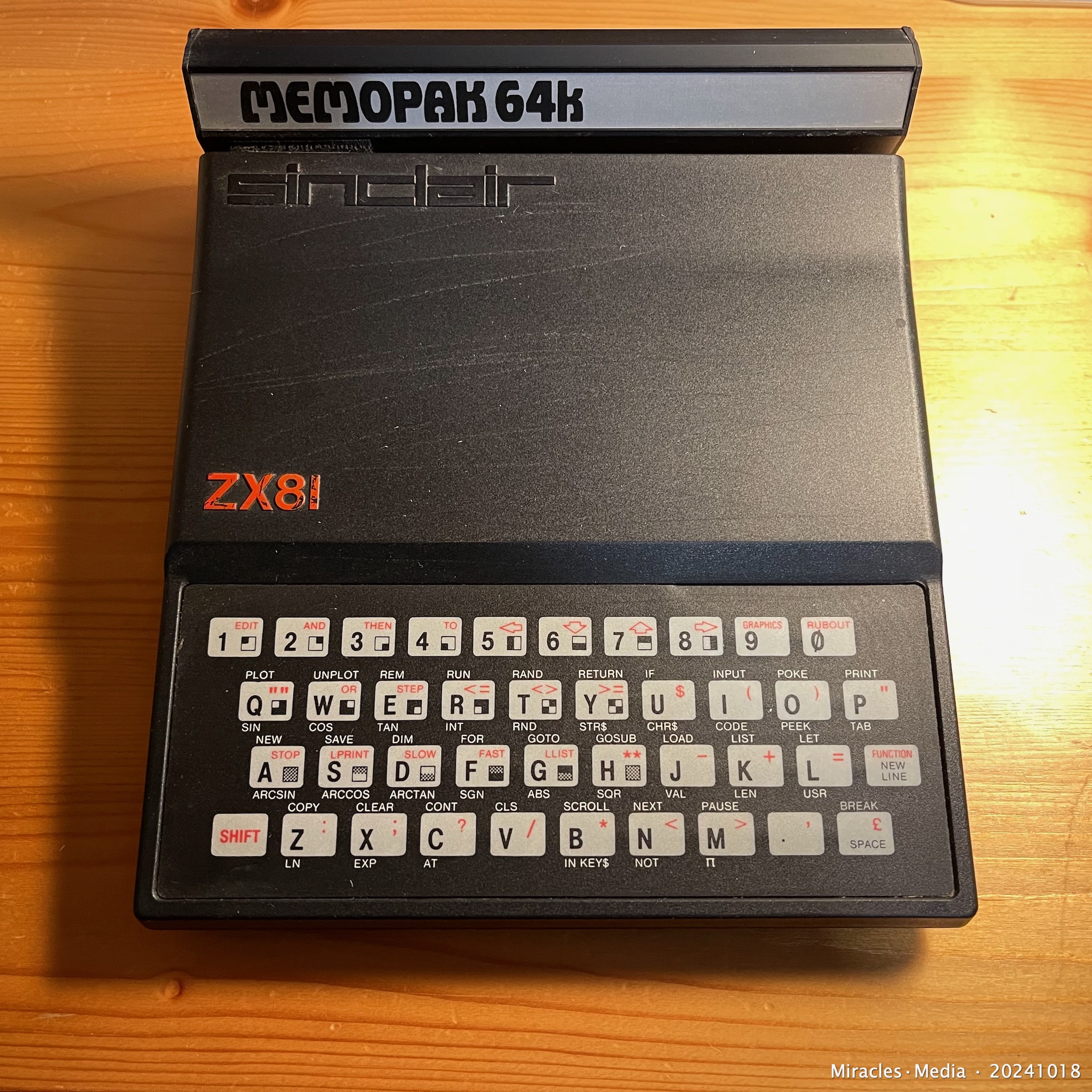
Sinclair’s ZX81 computer (1KB on-board memory , with a 64K memory expansion module inserted at the back) – my first PC – that I started using from 1983 for automation of work in our experimental pancreas and islet transplantation research project – for creating (coding) and using the entire suit of apps, needed for the raw data processing and the (statistical and pharmacokinetic) analysis.
The hardware set-up included a TV (B/W) as monitor, (mono audio) tape recorder for data storage (apps), and a small thermal printer.
Citation info : ZX81 • Michel van der Burg • Miracles•Media • 20241018 • TakeNode 9c595df8-8091-497c-9c9c-ff85fe4de397 • URL 1-memo•com
PDFA update | 20221124 | Miracles•Media
November 24, 2022 , update PDF to PDF/A file … a tech story.
The original PDF upload at Miracles•Media on Nov 11, 2022 has been replaced today by the PDF/A version prepared Nov 12, 2022 for the Dutch National Library. That PDF/A file was produced by simply opening the original Nov.11 PDF in the Mac app ‘Preview’ (dutch ‘Voorvertoning’) , and saving that unmodified file (exporting) as PDF/A. The ‘A’ means for longterm archiving.
Comparing properties of both files in Adobe Acrobat Reader no differences were noted, except that the Nov 12th file ‘claims’ compliance with the PDF/A standard. Though both PDF version 1.3 files are expected to be identical / archival proof – offering one identical file both at Miracles.Media and the Dutch National Library is preferred.
I hesitated making this update – but it is required , right?!. Therefore the Miracles.Media site now also offers that same PDF/A file download : Viviane’s Story | ISBN eBook (PDF/A) 9789493147010 | 20221112 .
Pages – the software used for preparing these ePub and PDF ebooks – does not offer PDF/A export. PDF/A export was excellent last October using ABBYY PDF software for final output of another ebook (thesis) based on scanned paper. However ABBYY re-processing Nov. 11 of this 100 percent digital ebook – just in order to have a certified PDFA – gave poor results, and thus not done. November 12th I learned that simple workaround of reprocessing using Apple’s ‘Preview’ app.
Meanwhile that first – Nov 11 – file has been downloaded over 130 times.
This image :
PDFA update | 20221124 | Miracles•Media | TakeNode ID 3dac56a4-04f7-438e-9f15-8f90459426b5
New User HDR Title Templates | 20220918 | Michel van der Burg | Miracles•Media | Quod Erat Demonstrandum (Which was to be demonstrated). Video made with a new user account on my Mac using Final Cut Pro first time in that account – using the yesterday presented custom made HDR title templates (BUM20220917_Titles). First, before starting FCP, the Titles folder (containing the HDR_Titles folder) was dragged inside the (empty) Motion Templates folder in the Movies folder of this new account. See yesterday’s post (HDR Title Templates Final Cut Pro | 20220917 | https://1-memo.com/2022/09/17/hdr-title-templates-final-cut-pro-20220917/ ) for more info on the use of this free download of HDR Title templates via buymeacoffee•com/miracles•media . TakeNode : c5a4797b-e1d2-498e-bff9-4d3cef83b07b
HDR Title Templates Final Cut Pro | 20220917 | Michel van der Burg @ Miracles•Media | Custom made HDR title templates for use in both HDR or SDR projects in Final Cut Pro. Use the templates in HDR projects with eg 50-100% opacity. In SDR projects use these HDR templates with eg 2-5% opacity. Free download HDR_Titles at buymeacoffee•com/miracles•media . TakeNode (license) title templates (BUM20220917_Titles) : 8875369d-fe0a-4e62-8986-c3ffebb5eec2
Limited number of slots available .
Instructions for use : Download and Unzip the folder file BUM20220917_Titles.zip containing the folder HDR_Titles. Move the HDR_Titles folder into your Titles folder inside your folder Motion Templates in the Movies folder … see guide in description below.
Open the folder BUM20220917_Titles. This contains the folder Titles with the template folder HDR_Titles.
On your Mac open folder Movies , go to folder Motion Templates. Open Motion Templates , if your folder already contains a Titles folder , just drag the HDR_Titles folder inside your Titles folder (see image in video). Else, if your Motion Templates folder has no Titles folder , drag the downloaded Titles folder (containing the HDR_Titles folder) inside your Motion Templates folder (see image in video). Feel free to support my work and buy me a coffee ;) I just created that page. Title templates (2) names :
01HDR4KLowThird100
02HDR4KCredit100
Download BUM20220917_Titles (limited number available) via buymeacoffee•com/miracles•media
TakeNode video : fd4c27af-1829-4687-9c5d-5493da89469e
① memo 20170329 ~ Screen Artefacts Shutdown Sierra MacOS ~ Screen artefacts on shutdown of the Sierra macOS (10.12.1 to 3) on iMac 27″ 5K Late 2015 – Note the artefacts vary greatly (in color and shape) every time this issue occurs. Apple Community discussion https://discussions.apple.com/message/31565864 . Problem exist for some 6 months now , whether update 4 helps is unknown yet – Apple is silent on this.